Accounts Payable Automation: Start With Capture
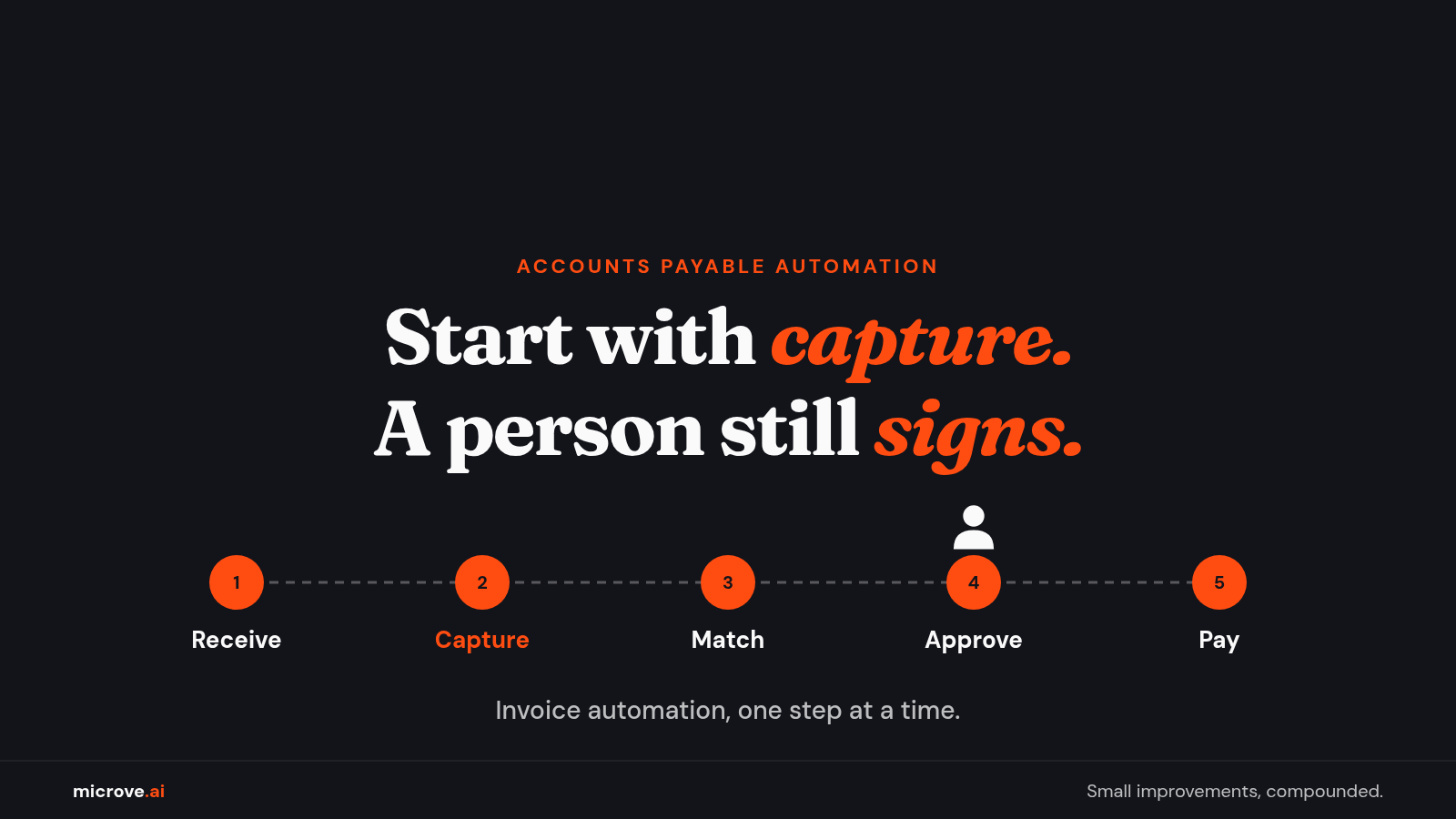
Start with capture. Here is what a small finance team can automate first with AI, and where a person still signs off.
A supplier emails an invoice on Monday. By Friday it is still sitting in someone's inbox. Someone has to read it, type it in, find the order it belongs to, ask a manager to approve it and pay it on time.
None of that work is hard. It is a lot of small steps, repeated for every invoice, every week.
This article is about accounts payable automation: what it means, which step to automate first, and where a person should still sign. It is written with a small finance team in mind. The ideas work at any size.
What accounts payable automation is, in plain words
Accounts payable, or AP, is the money your company owes its suppliers for goods and services it has already received. An invoice is the supplier's bill. A purchase order, or PO, is your own written order that says what you agreed to buy, how many and at what price. For example, you order 10 office chairs. The PO says 10 chairs. The supplier's invoice arrives later.
Accounts payable automation means software does the repeat steps along that path. A person no longer retypes, chases and compares by hand. People still decide. Software does the typing, the sorting and the reminding.
Your books live in accounting software. In our view, automation works best when it fills the system you already use instead of replacing it.
Where invoices lose time
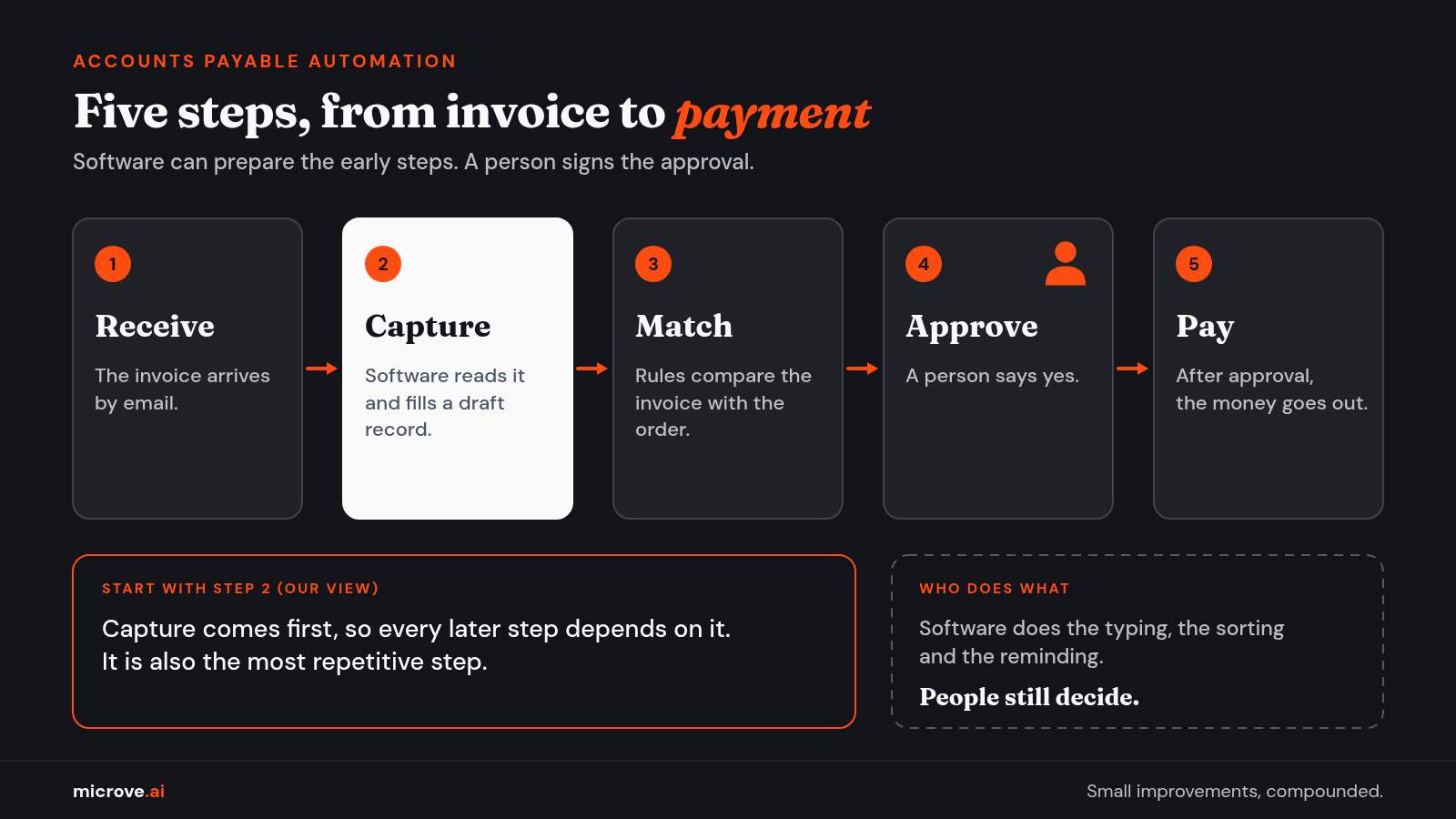
Think of the invoice path as five steps: receive, capture, match, approve and pay. Capture means getting the invoice details into your accounting record. Match means checking the invoice against the order. Approve means a person says yes. Pay means the money goes out.
Where does the time go? One vendor survey gives a hint. In the 2026 Global Finance Outlook Index (page updated Oct 15, 2026), 2,116 finance, procurement and AP professionals answered questions. They worked at companies with at least 20 employees in Canada, Germany, the Netherlands, the United Kingdom and the United States.
The survey ran Aug 3 to 24, 2026, and was run by an outside research firm for the company that published it. The stated margin of error is plus or minus 2.1% at 95% confidence, for the full sample. Smaller groups carry a wider margin. That company sells AP software. Read it as one vendor's survey, not a ruling.
In the survey (page updated Oct 15, 2026), respondents named three top things that slow AP. They were resolving errors (39%), chasing invoice approvals (32%) and mismatched POs and invoices (29%). Among respondents with fully or partly automated AP, no single AP step was automated by more than 37%. Matching invoices and POs, payment reconciliation and electronic approval routing were each at 37%.
In that survey (page updated Oct 15, 2026), 46% of respondents said their finance team has implemented AI tools or AI agents. Only 6% described their AP as fully automated with agentic AI, meaning AI agents that carry out multi step tasks.
The survey covers five countries and companies with 20 or more employees. The page does not give results for small finance teams, and it does not say what to automate first. That part is our view. Here it is.
Invoice automation: start with capture
In our view, start with capture. Every later step depends on it, so it is the first step to automate. It is also, we think, the most repetitive step. And a mistake here is easy to catch, because you can hold the record next to the invoice and compare.
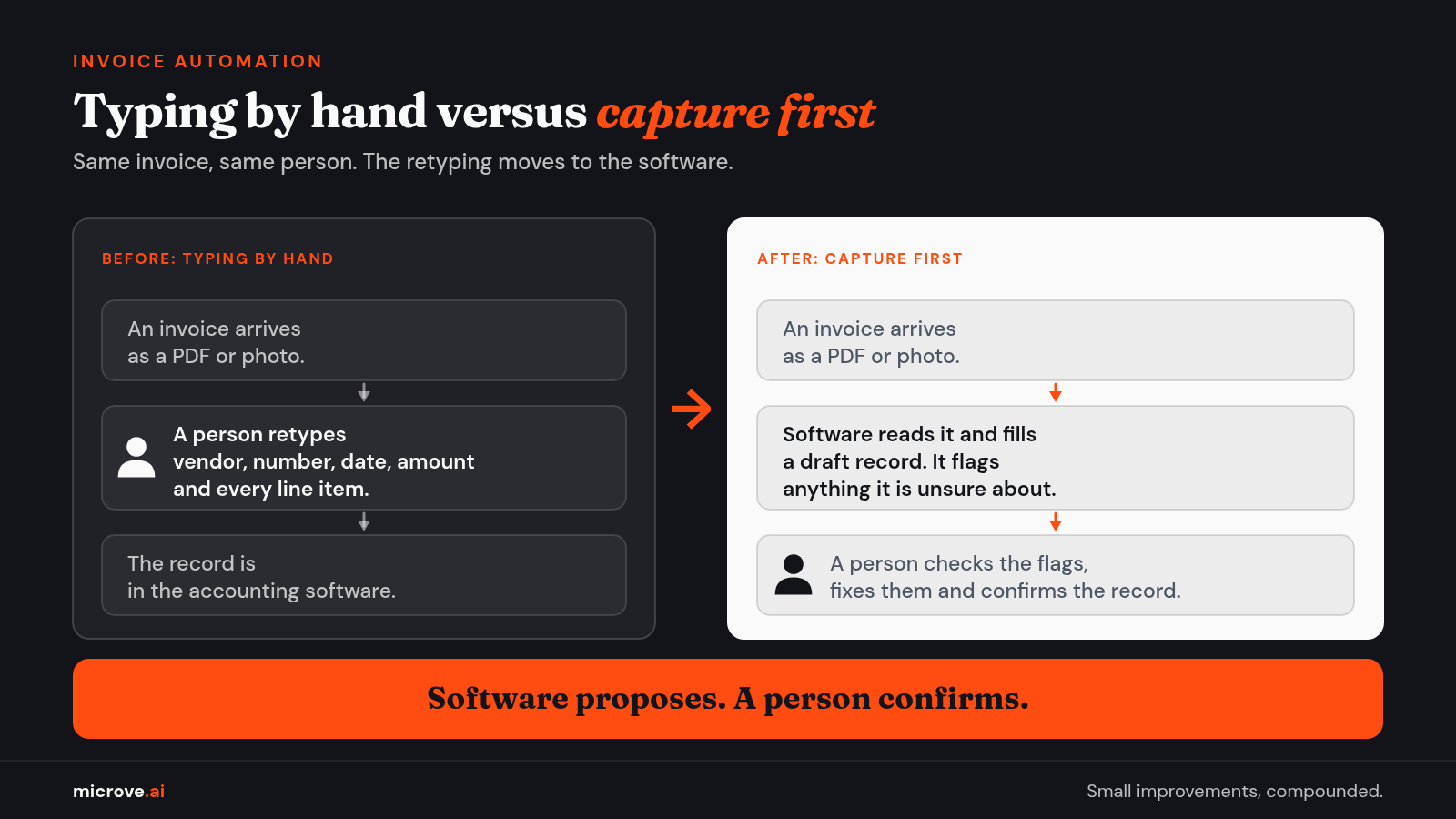
Here is how capture with AI works. An invoice arrives by email as a PDF or a photo. The software reads it and pulls out the vendor name, invoice number, date, amount and line items. A line item is one row on the invoice, such as "10 office chairs." The software then fills a draft record in your accounting software.
A person checks the draft. The software flags anything it is unsure about, such as a blurry number. The person fixes the flag and confirms the record. Software proposes. A person confirms. That pattern is called a person in the loop.
In our view, AI that reads documents can still misread an odd layout, such as a crowded table. That is why flagged items go to a person. We also think a short review of flags beats retyping every line.
Here is a related example based on our work. At a logistics company, field managers emailed receipt photos. The software read the vendor, date, amount and category and filled a spreadsheet. The managers changed nothing about how they worked. You can read it in the use case The Expense Report Chaos.
Accounts payable automation best practices
Once capture works, the next two steps are matching and approval routing. Our view on best practice here is simple: use rules first, and bring in AI only for exceptions.
A rule is a plain instruction that a computer follows the same way every time: if this, then that. Matching is a good fit for rules. A three way match compares three documents: the PO (what you ordered), the receiving record (what arrived) and the invoice (what the supplier billed). If all three agree, the invoice moves on.
For example, the PO says 10 chairs, 10 arrived and the invoice says 10. That is a match. If the invoice says 12, that is an exception: a case the rules cannot settle. The invoice stops and goes to a person.
Approval routing is also a job for rules. The software sends each invoice to the right approver based on the department or the amount. An approval limit is the amount above which a more senior person must approve. Your company sets those limits. The software only applies them.
AI earns its place on the exceptions. For example, an invoice line reads "chairs, large" while the PO says "executive chair." A rule cannot tell whether those are the same item. An AI model, which is a trained program that reads text and makes a suggestion, can propose a match. A person confirms it.
This is the same idea we describe in The Right Tool for the Right Bottleneck: rules where work is predictable, AI only where judgment is needed.
Where a person still signs off
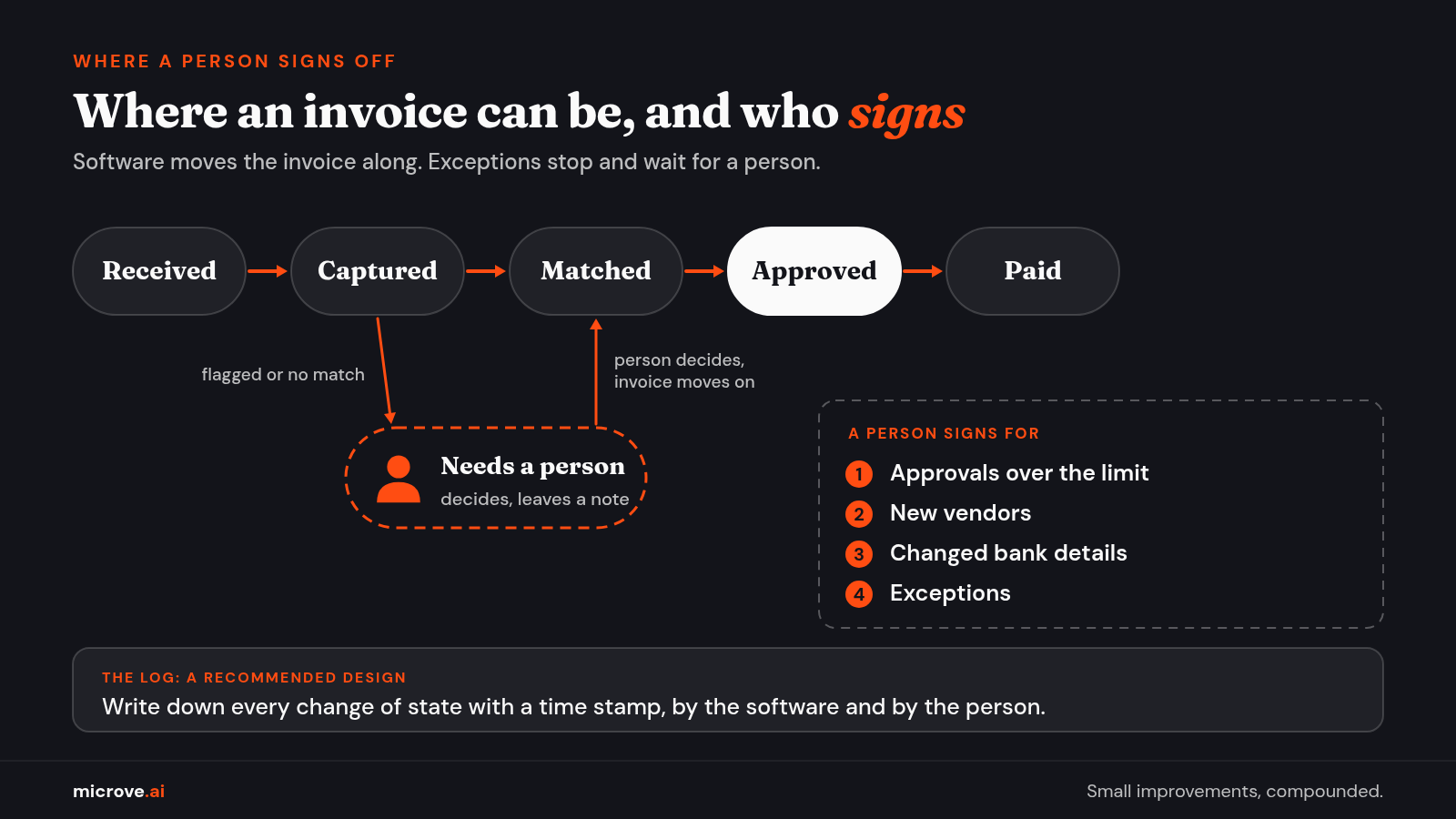
Software can prepare the work. A person should still sign for four things.
- Approvals over the limit. The limit is your company's call.
- New vendors. The first invoice from a new supplier gets a human look.
-
Changed bank details. A supplier asks you to pay a different account. Confirm by calling a number you already have, not the number in the email.
Changed bank details are a known route for payment fraud. The FBI's Internet Crime Complaint Center warns that criminals pose as a vendor, often through a compromised email account, and ask a company to send payments to a different bank account. It advises verifying payment changes in person or by a known phone number, and through a second channel. See its notices of Apr 6, 2020 and Sep 11, 2024.
- Exceptions. Anything the rules cannot settle goes to a person, who decides and leaves a note.
Also separate the duties. This is called segregation of duties: key duties are split among different people, so that no one person controls every part of a transaction. The U.S. Government Accountability Office describes it this way in the 2014 edition of its internal control standards, known as the Green Book. A 2025 revision has since replaced that edition.
One pair worth keeping apart is approving an invoice and setting up the vendor. That pairing is our application of the idea. It makes it harder for one person to create and pay a fake invoice.
In the survey (page updated Oct 15, 2026), the top barriers to going further with automation and AI were data security (36%), accuracy of automated tools (33%) and control and trust in AI (30%). Those are respondents' worries, in a five country survey. In our view, a person who signs plus a log helps with accuracy and control. Data security is a separate job, covered below.
A log is a time stamped record of what the software did and what the person decided. If someone asks "why did we pay this?" six months later, the log answers.
What Microve provides
We build working tools end to end. For invoices, that means we find where your AP time goes and build the capture, matching and approval routing. We connect it to the accounting software you already use, run it and keep it working. These are focused tools that connect to the software you already have.
Invoices hold supplier names, bank details and what you pay. That is data you should control. With a private deployment, the model runs inside your environment, and prompts are not sent to third party AI APIs. That applies to private deployments only. A private setup is not automatically secure. Access control, settings and monitoring still matter.
When we build a custom tool, the client owns it. Ongoing maintenance is an optional monthly plan.
Sometimes a rule or a setting in your accounting software is the whole answer. If that is true for you, we'll tell you.
The Bottom Line: Start with capture, and use rules for matching and routing. Use AI for exceptions, and keep a person on approvals, new vendors, changed bank details and exceptions.
Have an invoice workflow in mind? Start with a free consultation.