AI Agents for Business: Set Access Limits First
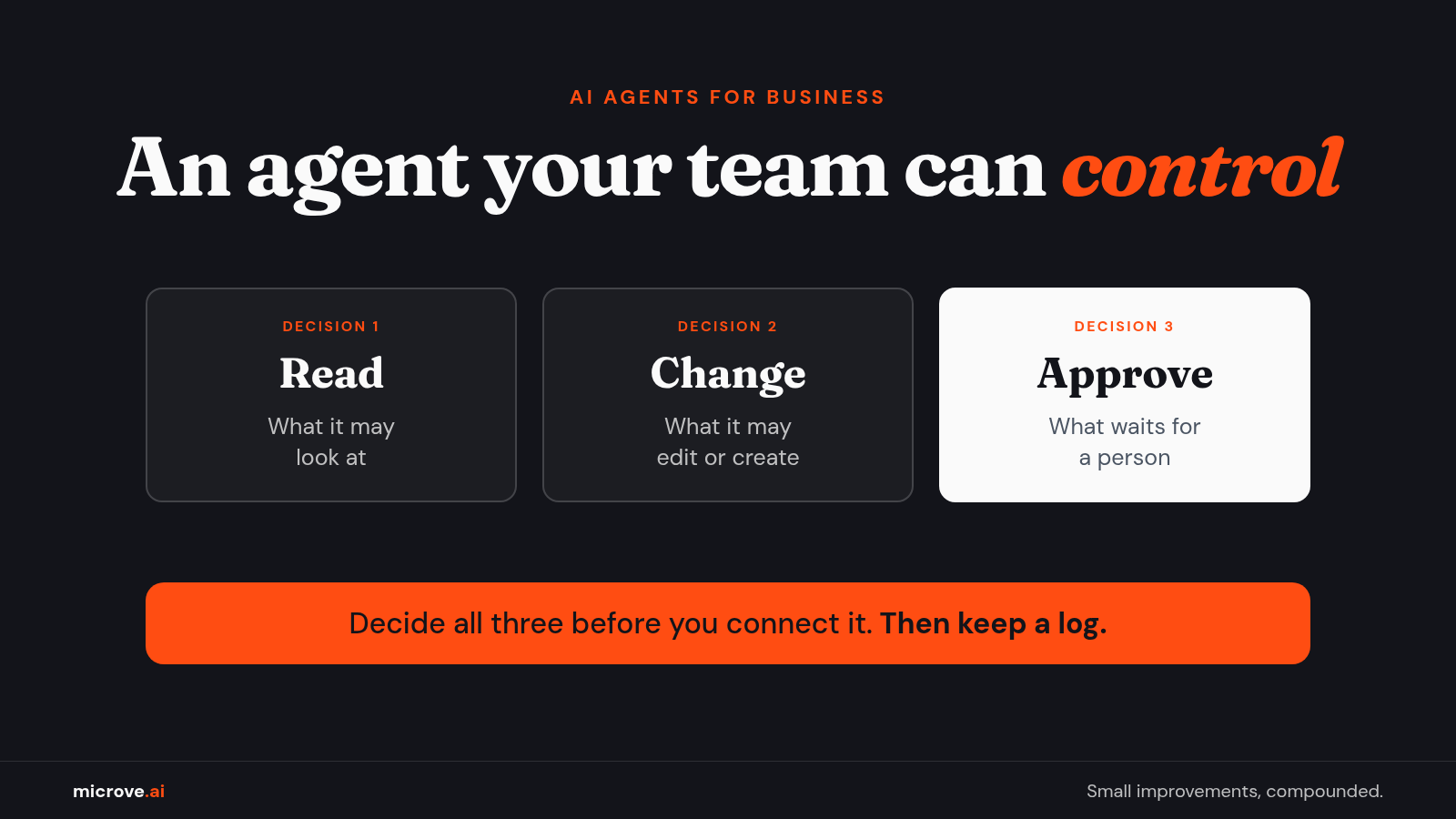
An AI agent your team can control starts with three decisions: what it may read, what it may change, and who approves the rest.
An AI agent demo is a lovely thing to watch. The agent reads an email, finds the customer, drafts a reply and updates the record. Nobody copies anything. Nobody sighs.
Then someone in the room asks the real question: what else can it touch?
That question is this whole article. Before you connect an agent to the software your business runs on, decide what it may read, what it may change, and who signs off on the rest.
First, what is an AI agent?
An AI agent is software that uses an AI model (the program that understands and writes text) to take steps toward a goal, not just answer a question. A chat tool tells you what a reply could say. An agent can open the inbox, find the order, write the reply and send it.
That is the appeal. It is also the risk. An agent that can act needs what a new employee needs: a clear job and the right keys. Not every key.
Why agents stall at the software you already run
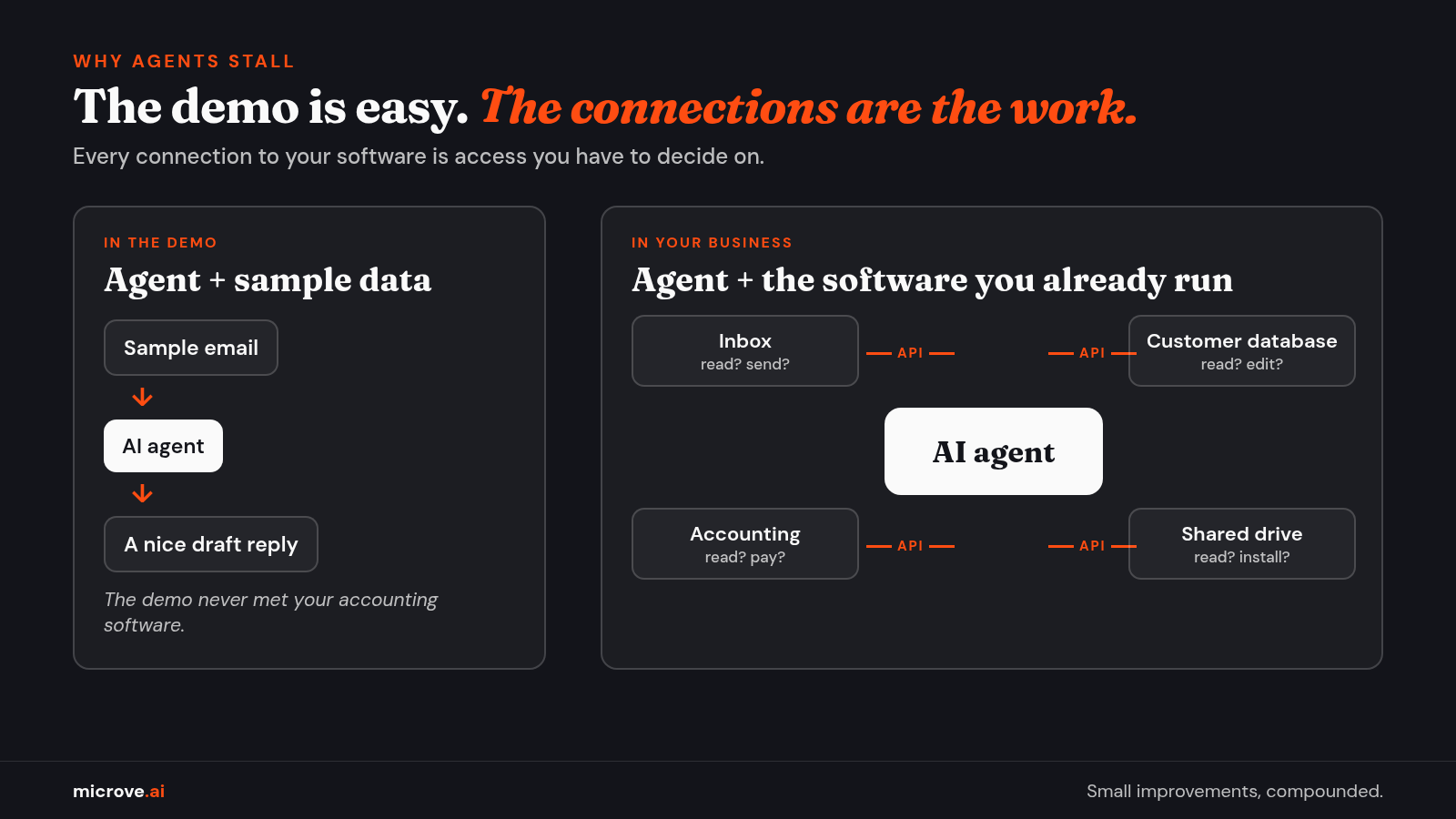
In many agent projects, the hard part is not the AI. It is where the agent meets your existing systems: the customer database, the accounting software, the shared drive, and the old tool nobody wants to touch.
Two terms help here. An integration is a connection that lets two programs share data or trigger actions. An API (application programming interface) is the door one program uses to ask another for data or a change, for example "send me this customer's open invoices."
The surveys point the same way. In a vendor-run survey of 300 senior technology, risk and AI leaders in the U.S., Canada and the U.K., mostly at companies above $1 billion in revenue (Redwood Software, Oct 22, 2026), 82% agreed that existing systems are a bigger obstacle to scaling AI than a lack of strategy.
In the same survey, only 42% reported a strong ability to connect AI agents to legacy or core systems. Legacy systems are the older programs a business still depends on every day.
Agents are already at work in many companies. In a July 2026 survey of 1,019 B2B (business-to-business) decision-makers worldwide (G2, Oct 14, 2026), 66% of B2B agent buyers said they have agents in limited or scaled production, meaning in real daily use by some teams or across the company.
Fewer keep track of them. Surveys disagree on how many firms keep a central list of their agents (42% in Redwood's sample, 27% in G2's). If you cannot list your agents, you cannot limit them.
So the hard part is the connection. And the moment you connect an agent, you hand it access.
Set access limits before you connect an agent
Before an agent connects to your systems, decide what it may read and what it may change. In October 2026, major U.S. banks said they block third-party AI agents that log in with a customer's password, and at least one allows only limited, read-only data access through approved providers (Reuters, Oct 22, 2026; USA Today, Oct 23, 2026).
Security researchers also showed coding agents installing unverified software named in company documentation (Ars Technica, Aug 27, 2026).
Our rule: give each agent its own limited access, start read-only, require a person to approve payments, installs and outgoing messages, and keep a log you can review.
A few words in that rule need unpacking:
- Permissions are the settings that say what an account may see and do. "Can view invoices" is one permission. "Can pay invoices" is a very different one.
- Its own limited access means the agent gets its own account, not a person's password. An agent that logs in as you is not an assistant. It is you, with fewer second thoughts. Every system sees your name on what it does.
- Least privilege is the habit behind all of this: give each account only the access its job needs. The new receptionist gets a key to the front door, not the safe.
- Read-only means the agent can look but not change. It can read your CRM (customer relationship management system, where customer records live) but cannot edit a deal.
- A coding agent is an AI agent that writes and runs code for software developers. In the research case, install instructions in documentation files pointed to software names nobody had registered, so anyone could claim them. Some agents followed the instructions and ran the code.
The lesson works for any agent: what it reads can turn into what it does. Allow software from approved sources only, and check it before an agent installs anything.
Give access one step at a time
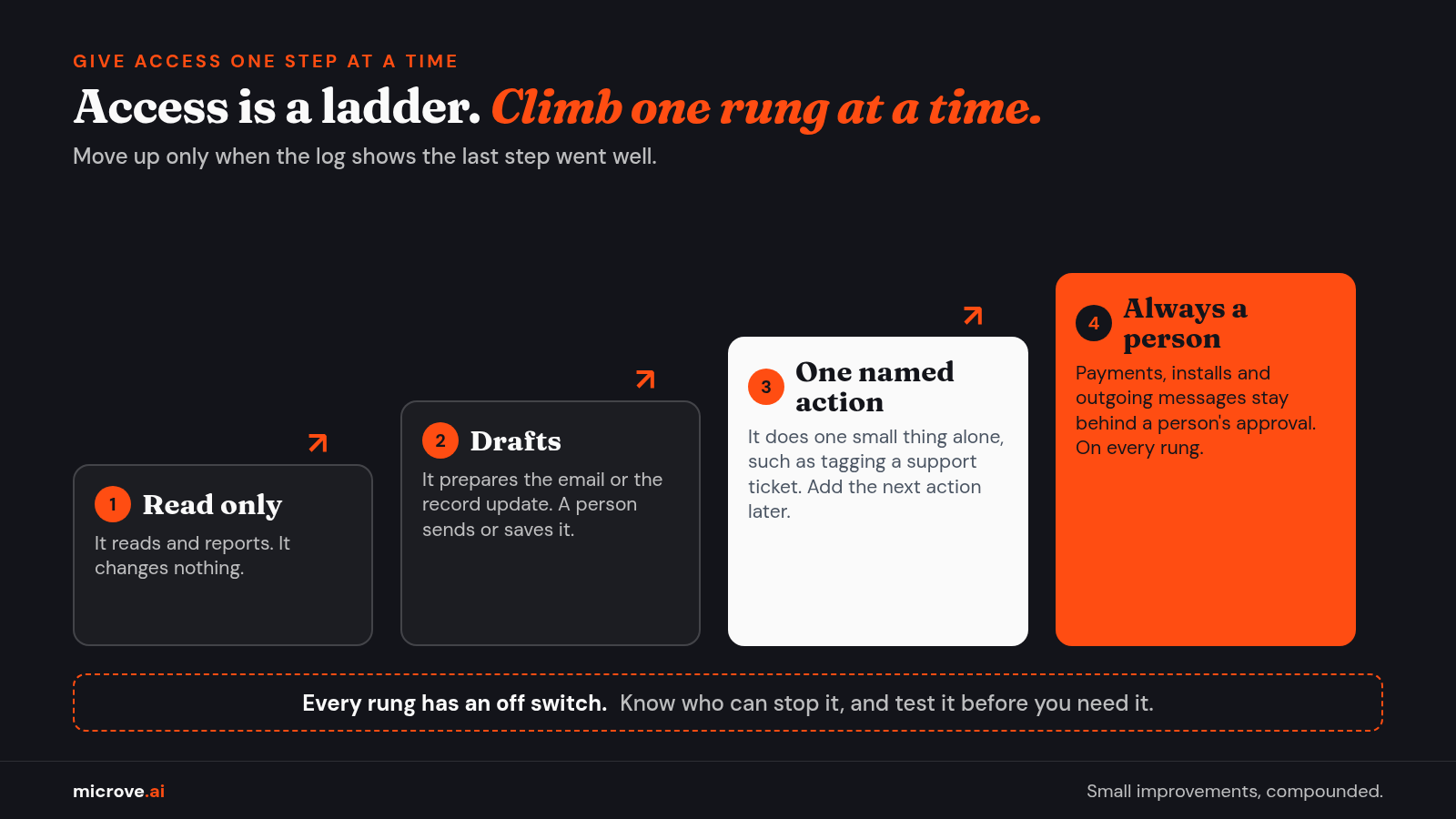
Think of access as a ladder. The agent starts on the bottom rung and climbs only when it has earned it.
- Read only. It reads and reports. It changes nothing.
- Drafts. It prepares the email, the invoice reminder or the record update. A person sends or saves it.
- One named action. It may do one small thing on its own, such as tagging a support ticket. Add the next action only after the log shows the last one went well.
- Always a person. Payments, installs and outgoing messages stay behind a person's approval.
Every rung has an off switch. Know who can turn the agent off at once, and test it before you need it.
Keep a log you can review
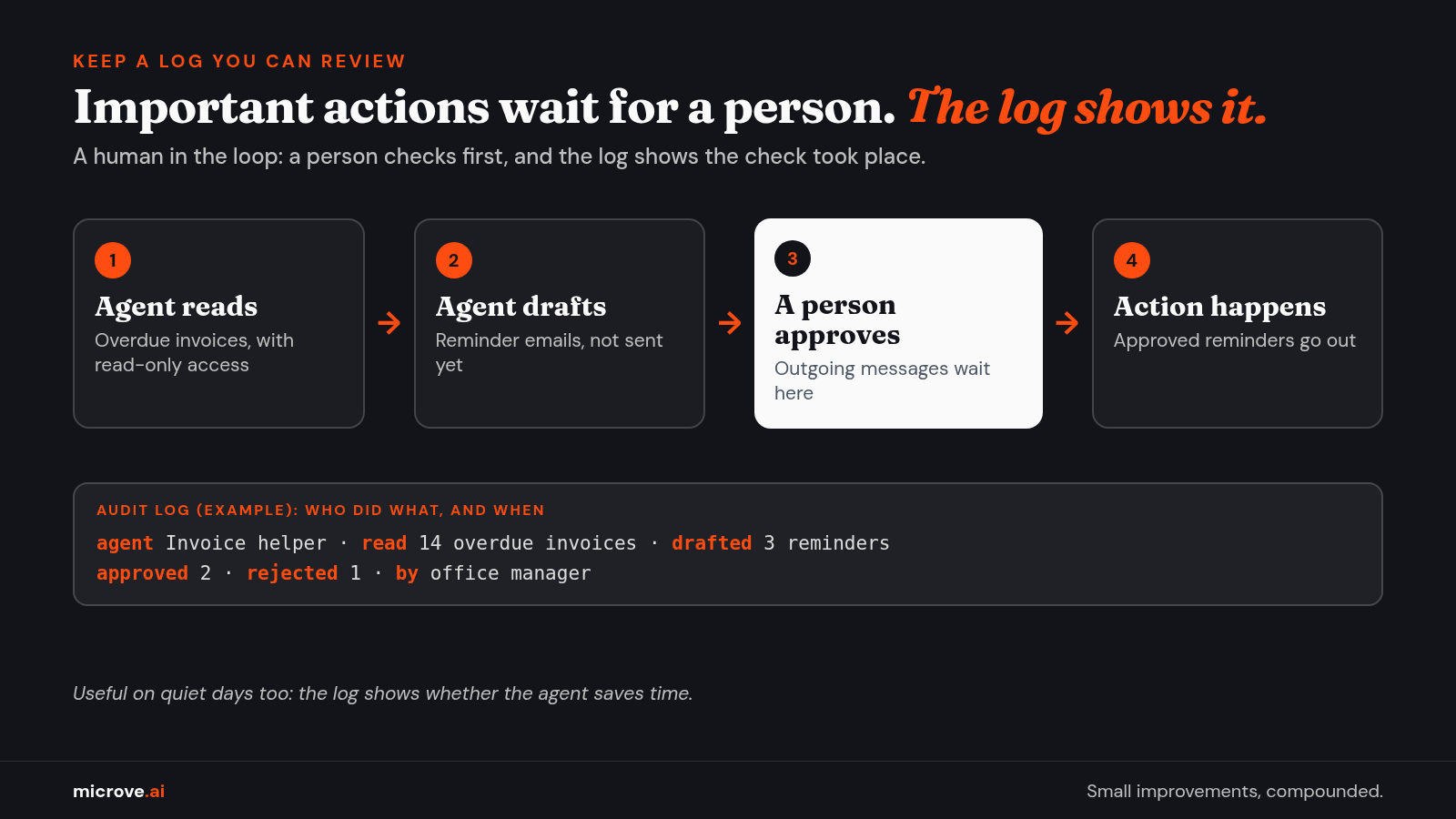
An audit log is a record of who did what, and when. For an agent, it should show which agent acted, what it read, what it changed or sent, and who approved it.
For example: "Invoice helper read 14 overdue invoices, drafted 3 reminders; the office manager approved 2 and rejected 1." One line like that answers the usual questions before anyone has to ask them.
This is what people mean by a human in the loop: a person checks the important actions before they happen, and the log shows that the check took place.
A log is useful on quiet days too. It shows whether the agent saves time, which is the reason you set it up.
A one-page access sheet for each agent
Before an agent goes live, fill in one page. If a line stays blank, the agent is not ready.
- Name and job. What it does, in one sentence.
- Owner. The person responsible for it.
- Reads. Which systems and folders it may read.
- Changes. Which records it may create or edit, if any.
- Approvals. Which actions wait for a person.
- Login. Its own account, never a shared password.
- Log. Where the log lives and who reviews it, and how often.
- Off switch. Who can stop it, and how.
The Bottom Line: An agent your team can control is not a smarter agent. It has a short list of keys, a person at the important doors, and a log anyone can read.
How we build agents
We implement AI end to end. We find the workflow worth automating, build the agent, connect it to the software you already use with the access it needs and no more, run it, and then measure and maintain it.
Sometimes the right answer is not an agent at all. A simple rule or one integration does the job. If you don't need AI, we'll tell you.
New to the vocabulary? Our AI terms in plain English page explains the words in this article and more. Comparing providers? See Before you sign: where will our AI run?
Planning your first agent? Get in touch, and we will help you decide what it should read, change and log.