Which steps of a workflow need AI? Decide each one before you build
AI automation is not one switch. Sort each step of a workflow into a rule, an AI model or a person, using six short checks.
Field managers at a logistics company emailed photos of their receipts. Accounting then spent hours each week typing the details in and filing every image by hand. In an example based on our work, we left the email habit alone and automated what came after it.
Two steps sat behind that email. The first was reading the photo and pulling out the vendor, the date, the amount and the category. That step used AI, because a photo is not neat data.
The second was filing: make a folder by manager, year and month, rename the file, and put it in place. That step ran without anyone touching it. Our view: it is a step for a plain rule, because the same inputs should always end up in the same folder.
AI automation works one step at a time, and each step can have a different answer.
What AI automation means
A workflow is a chain of steps that turns a request into a result, such as a receipt photo becoming a filed expense. AI automation means software runs the chain by itself and uses an AI model only for steps that need reading or judgment. An AI model is software trained on many examples so it can read text or images and answer, such as pulling amounts off a receipt.
Other steps use a rule. A rule gives the same answer every time, such as "if the file came from this manager, put it in this manager's folder." Some steps belong to a person, who decides, approves or signs.
Whether you call it business automation AI or workflow automation, you are really choosing between three kinds of step: rule, AI or person. Our view: make that choice for every step before anyone builds. (More in AI terms in plain English.)
Six checks for each step
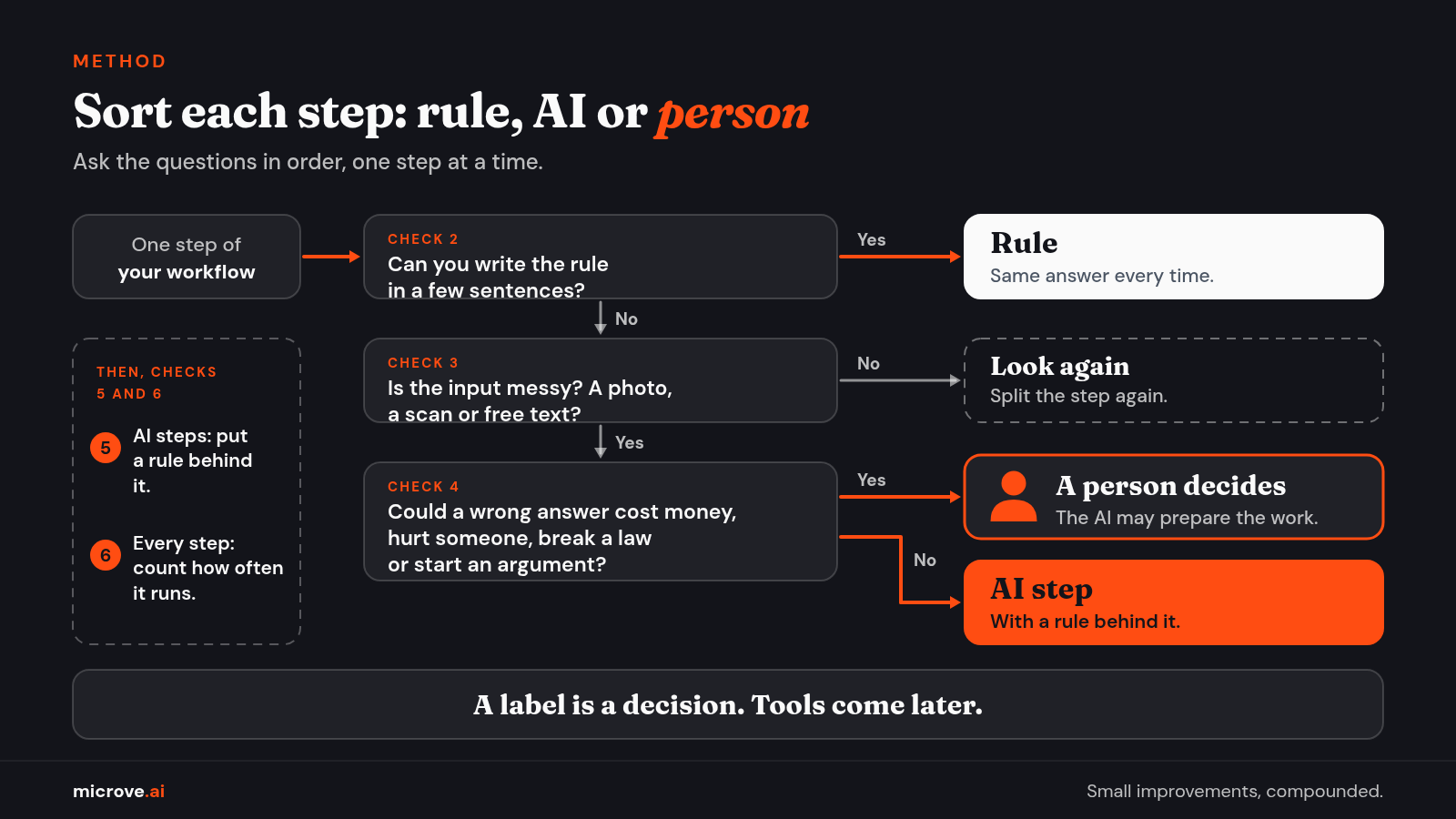
Write each step on its own line, then ask these questions in order. Our view: this is the method we use, not an industry standard.
- Say the step in one sentence. What goes in, and what comes out? If one sentence is not enough, split the step.
- Can you write the rule? If a few plain sentences give the same answer every time, use a rule.
- Is the input messy? A photo, a scan, a voice message or an email in free text has no fixed shape. An AI model can read those. If the input is neat and you still cannot write a rule, split the step again.
- What does a wrong answer cost? If it could cost money, hurt someone, break a law or start an argument, a person decides. The AI may prepare the work. A person signs it.
- Can you check the result? Put a rule behind every AI step. For example, if the amount is missing, or the AI says it is unsure, send the step to a person.
- How often will it run? Count the runs for every step before you build.
Why check 5? An AI model can give an answer that sounds sure and is wrong. That is called a hallucination.
In a global survey of 1,500 IT leaders and decision makers, commissioned by a data platform company and taken in September 2026, 98% of respondents said they had pulled back at least one AI deployment because of failure, hallucinations or unexpected behavior. The release does not name the countries. (Source: Cloudera press release, Oct 26, 2026. Survey by Wakefield Research.)
Our view: it is one vendor survey, but a fair reason to build the check.
Why check 6? Many AI services measure use in tokens. A token is a small piece of text, often a word or part of a word. In the same survey, 89% of respondents said they had limited or redesigned AI use cases because of rising token consumption.
The U.S. Cybersecurity and Infrastructure Security Agency (CISA) and partners, including Canada's Cyber Centre, published joint guidance on Oct 22, 2026. It describes how organizations pay for AI services based on usage, measured in tokens. (Full text: Canadian Centre for Cyber Security, ITSM.00.125.) CISA says unmanaged token consumption "may contribute to rising and unpredictable costs," among other risks. Whatever kind of step you choose, count how often it runs.
Try it on one workflow
A customer asks by email to change an order. Here is one way to label the steps. It is a teaching illustration, not a client project.
- The email arrives in the shared inbox. Rule.
- Read the email and find the request. AI. If no order number is found, a person takes over.
- Look up the order. Rule. One number points to one record.
- Draft a reply. AI.
- Approve and send. Person. A wrong promise can cost money.
- Write a log entry. Rule. A log is a time stamped record of what happened.
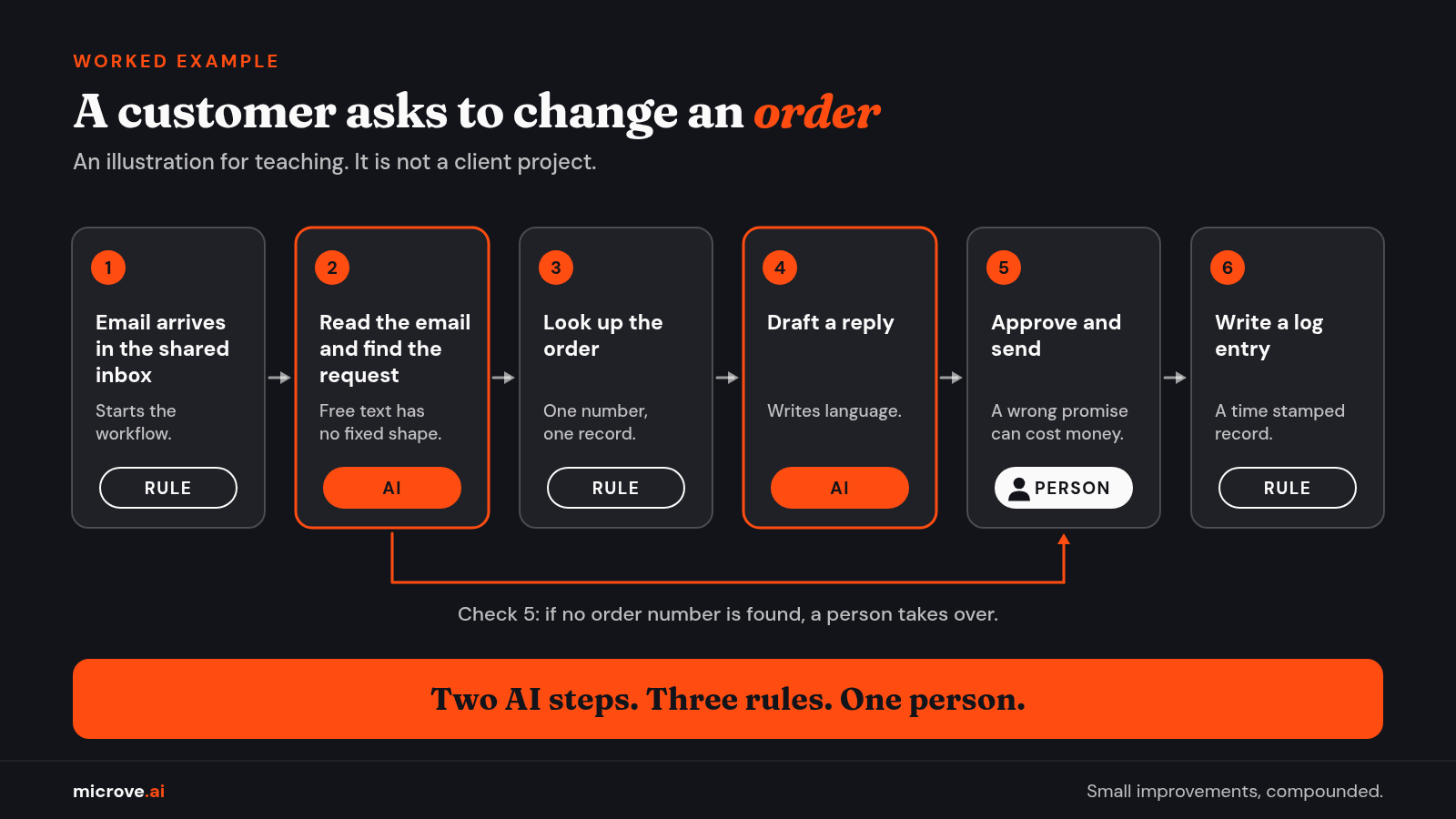
Two AI steps. Three rules. One person. We did not put AI on every step. Our view: the model belongs where the input is messy, and a person belongs where a wrong answer costs too much.
Write it on one page
Build the step sheet below in a spreadsheet. Use one row per step: the step, its label, how you check it, how often it runs and what data it sees. Each AI step reads your data, so in the last column also note where the model runs.
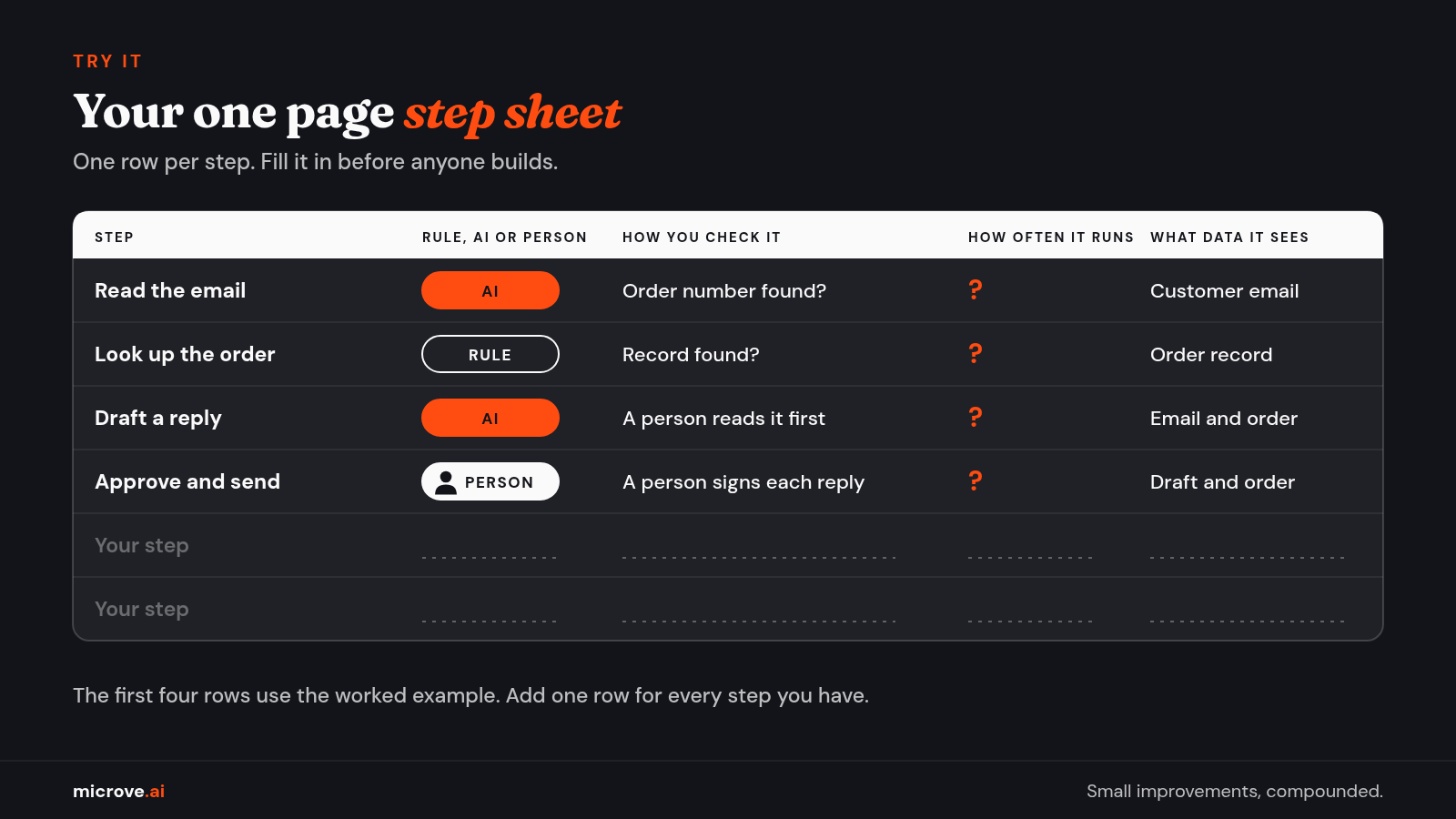
Our view: if you cannot fill in a row, you are not ready to build that step.
What Microve provides
We do this work end to end. We find the workflow, sort its steps into rules, AI and people, build it, connect it to the software you already use, run it and, if you want, maintain it. If you do not need AI for a step, we will tell you. See what we do.
Data privacy is part of the design. With a private deployment, the model runs inside your environment, and prompts are not sent to third party AI APIs. An API is a connection that lets one program send requests to another company's service. That applies to private deployments only. A private setup is not automatically secure. Access control, settings and monitoring still matter.
When we build a custom tool, the client owns it. Ongoing maintenance is an optional monthly plan.
The Bottom Line: Do not ask whether a workflow needs AI. Ask it of each step: a rule when the answer is always the same, AI when the input is messy, a person when a wrong answer costs too much, and a check behind every AI step.
Have a workflow in mind? Start with a free consultation.