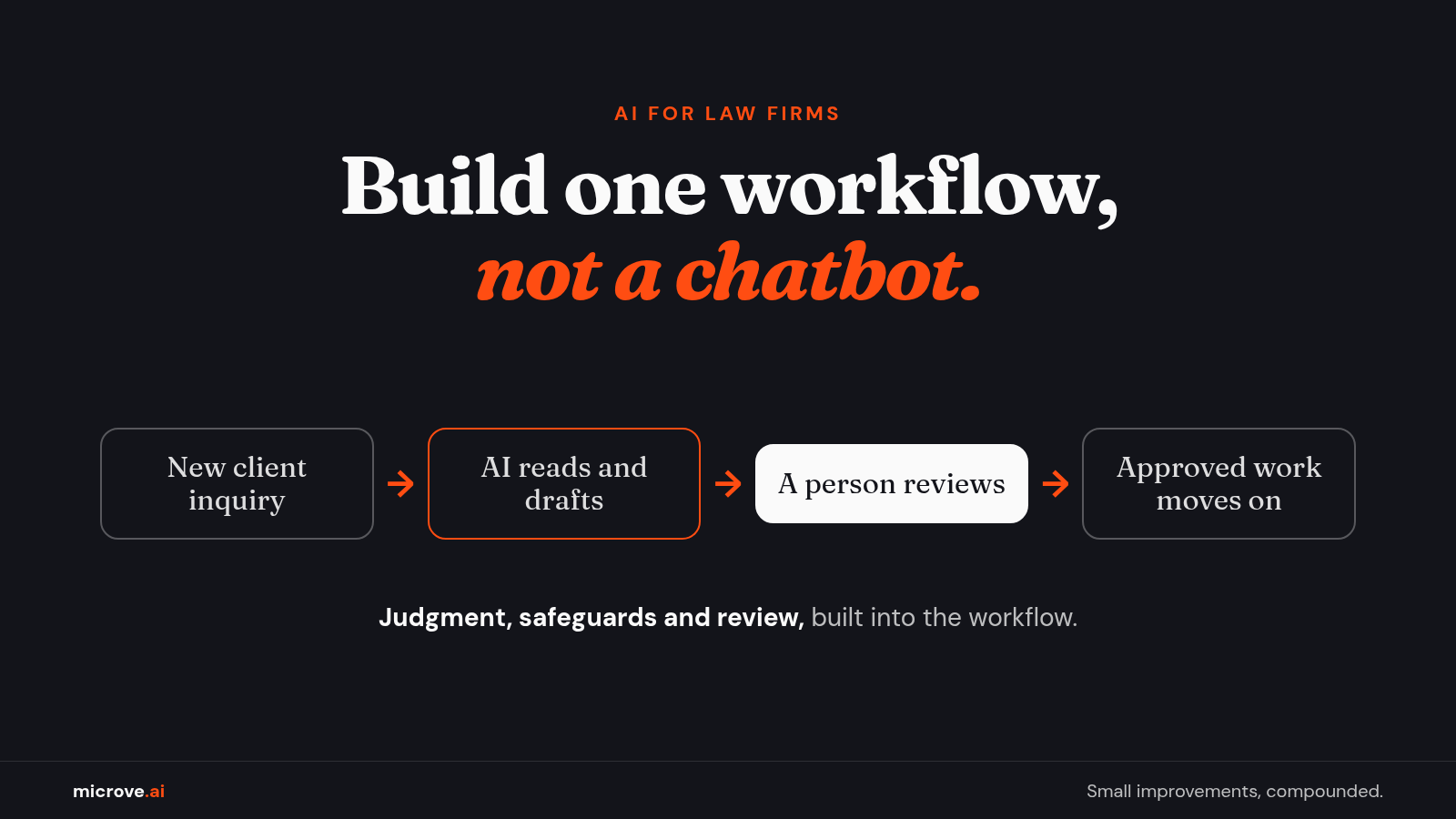
AI for Law Firms: Build One Workflow, Not a Chatbot
The bar guidance we look at here does not ban AI. It asks for judgment, safeguards and review. Build one workflow with all three.
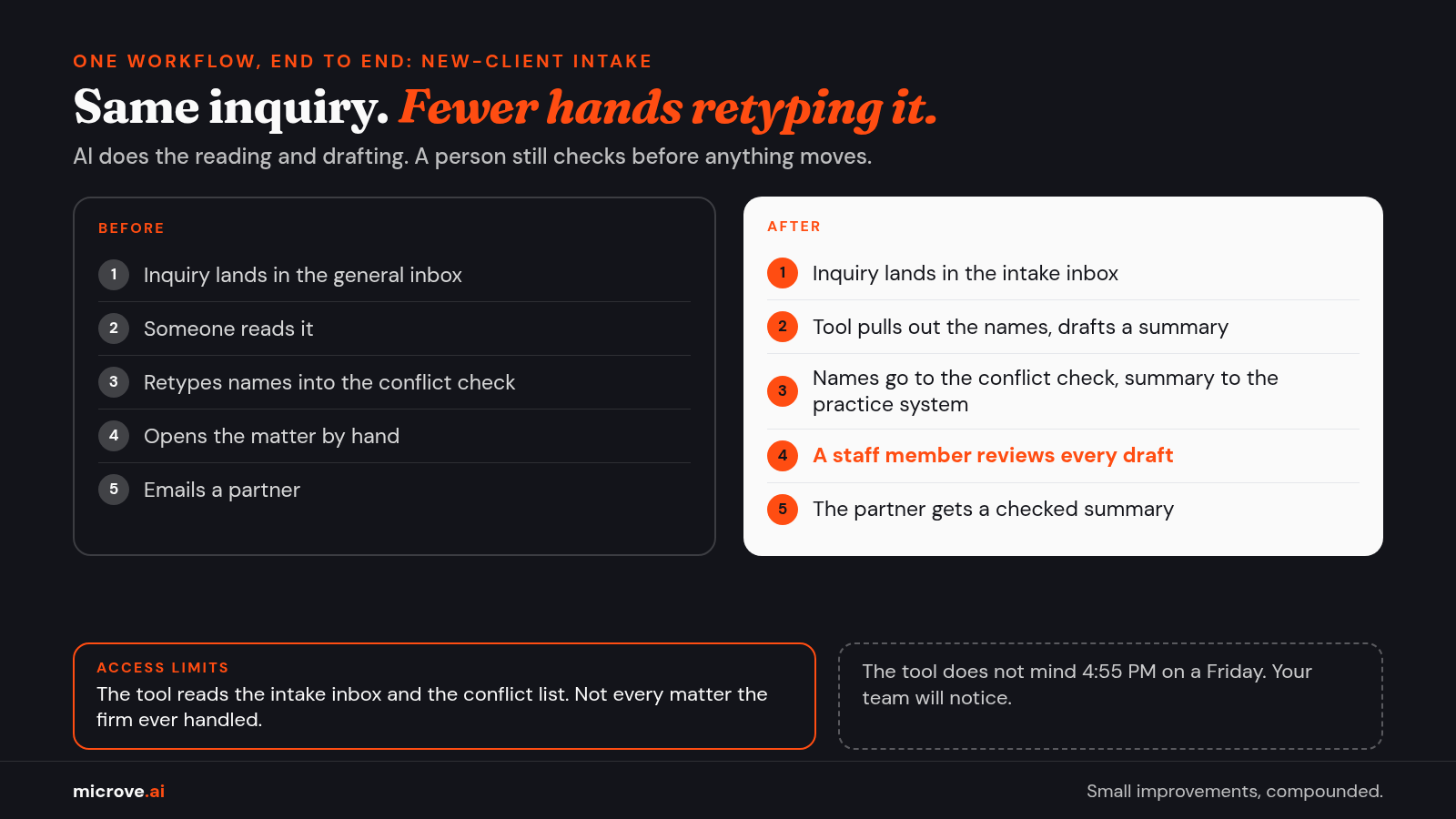
It is 4:55 PM on a Friday. A new client inquiry lands in the general inbox. Someone has to read it, type the names into the conflict check, open a matter and tell a partner.
Nobody wants that job at 4:55 PM. That is exactly the kind of work AI can help with, if you build it right.
This article is for law firms first. The same steps fit any professional-services firm that handles client information: accountants, consultants, insurance brokers, architects.
It is educational, not legal advice. Talk to your own counsel before you put client information into any new tool.
Why a chatbot is not a plan
It is tempting to start with a general chat tool. Someone pastes in a paragraph and gets a nice answer. Then that person still has to copy the answer into the matter file, the billing system and an email.
That is a tool, not a workflow. A workflow is the chain of steps a task goes through, from the moment it arrives to the moment it is done.
New-client intake is one. So is sending engagement letters, sorting incoming documents, or preparing a first draft of a routine contract.
Generative AI is the kind of AI that writes new text, such as a summary or a draft, from your instructions. It is very good at the reading and drafting parts of a workflow. It is not good at knowing which client a document belongs to, unless someone builds that in.
So the real job is not "use AI." It is: pick one workflow, build a tool for it, connect it to the systems you already use, and decide where a person checks the work.
What bar guidance actually asks for
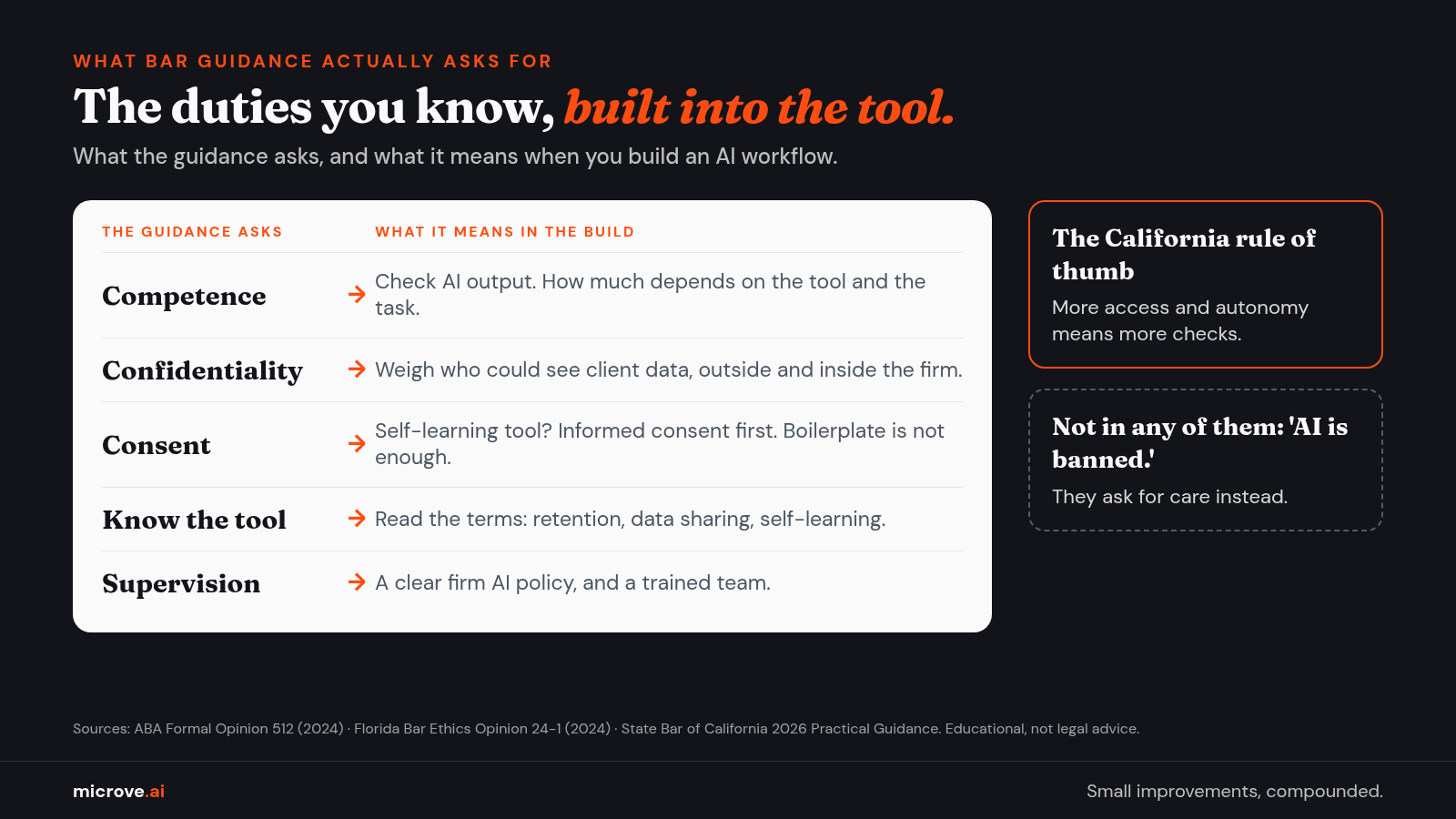
Start with the rules, because they shape the build. In ABA Formal Opinion 512 (July 29, 2024), the ABA's ethics committee ties generative AI to duties lawyers already have. These include competence, confidentiality, communication with clients, supervision and reasonable fees.
A few points from the opinion matter for any build:
- Check the output. A lawyer who relies on AI output without "an appropriate degree of independent verification or review" could violate the duty of competence. How much review depends on the tool and the task.
- Think inside and outside the firm. Before client information goes into a tool, the opinion says lawyers must weigh the risk that people outside the firm, and people inside it who might not protect it, get access.
- Consent has to be real. For self-learning tools, meaning tools that learn from what users type in, the opinion says informed client consent is needed before client information goes in. General, boilerplate language in an engagement letter is "not sufficient."
- Read the terms. Lawyers should read the terms of use and privacy policy of any AI tool, or ask someone who has.
- Set a policy. Managing lawyers must set clear policies on how the firm may use AI, and supervisors must train their teams.
State bars add their own guidance, and your state's rules are the ones that apply to you. Florida Bar Ethics Opinion 24-1 (January 19, 2024) says lawyers must research a tool's policies on data retention, data sharing and self-learning. It also says confidentiality concerns "may be mitigated" by an in-house AI tool rather than one where a third party hosts and stores the data.
The State Bar of California's 2026 Practical Guidance, approved by its Board of Trustees on May 14, 2026, adds a useful idea. The diligence and supervision a lawyer applies "must correspond to the level of system access and autonomy." In plain words: the more a tool can see and do on its own, the more checks it needs.
Notice what none of these say. None of them ban AI. They ask for judgment, safeguards and review, which is also how you would build any tool you plan to trust.
One workflow, end to end: new-client intake
Here is how that looks for the Friday inquiry. Same five steps for an accounting firm onboarding a new client, or a consultancy answering a request for proposal.
- Find the workflow. Sit with the person who does intake. Write down every step, every system and how long it takes today. That number is your baseline, the starting point you measure against later.
- Build a focused tool. The tool reads the inquiry and pulls out names: the prospective client, the other side, related companies. That step is called extraction, turning a messy email into clean fields. It then drafts a short summary for the partner. Plain rules handle the predictable parts, such as routing a family-law inquiry to the family-law team. AI handles only the reading and drafting.
- Connect it to the systems you already use. This is integration: the connection that lets two programs pass data, so nobody retypes names. The extracted names go into your conflict check, the search that makes sure the firm does not already represent someone on the other side. The summary goes into your practice management system, the software that holds matters, contacts and deadlines.
- Run it with a person in the loop. A staff member reviews every summary and every conflict list before anything moves. Nothing goes back to the prospective client without a person. Set access limits, meaning which data the tool can read: here, the intake inbox and the conflict list, not every matter the firm has ever handled.
- Measure and maintain. Compare the time per inquiry with your baseline. Spot-check the extracted names. When the AI model, the program that reads and writes the text, gets updated, test it again on a few old inquiries before you trust it. The California guidance makes the same point: competence includes reassessing a tool when the model changes.
If the firm also wants a chat window on its website for intake, Florida's opinion adds a point. The chatbot must tell people they are talking to an AI program, not a lawyer or an employee of the firm. The opinion also warns against an overly welcoming chatbot that may give legal advice.
Where the data goes, and who checks the work
Two questions decide whether this workflow is safe to run: where does the client information go, and who signs off on each draft?
For the first question, there are three common paths. A free public chat tool, where the provider's terms, not you, decide what happens to the text. A business AI service under a contract, where the terms decide retention and access.
Or a private deployment, where the model runs on hardware the firm controls, so prompts are not sent to third-party AI APIs. An API is the door one program opens so another can send it requests.
A private deployment changes who can see the data. It does not decide who inside the firm can see which matter, keep a record of who asked what, or check the answers. We wrote about that gap in what private AI doesn't fix.
If you use an outside service, our before-you-sign questions help you read its terms.
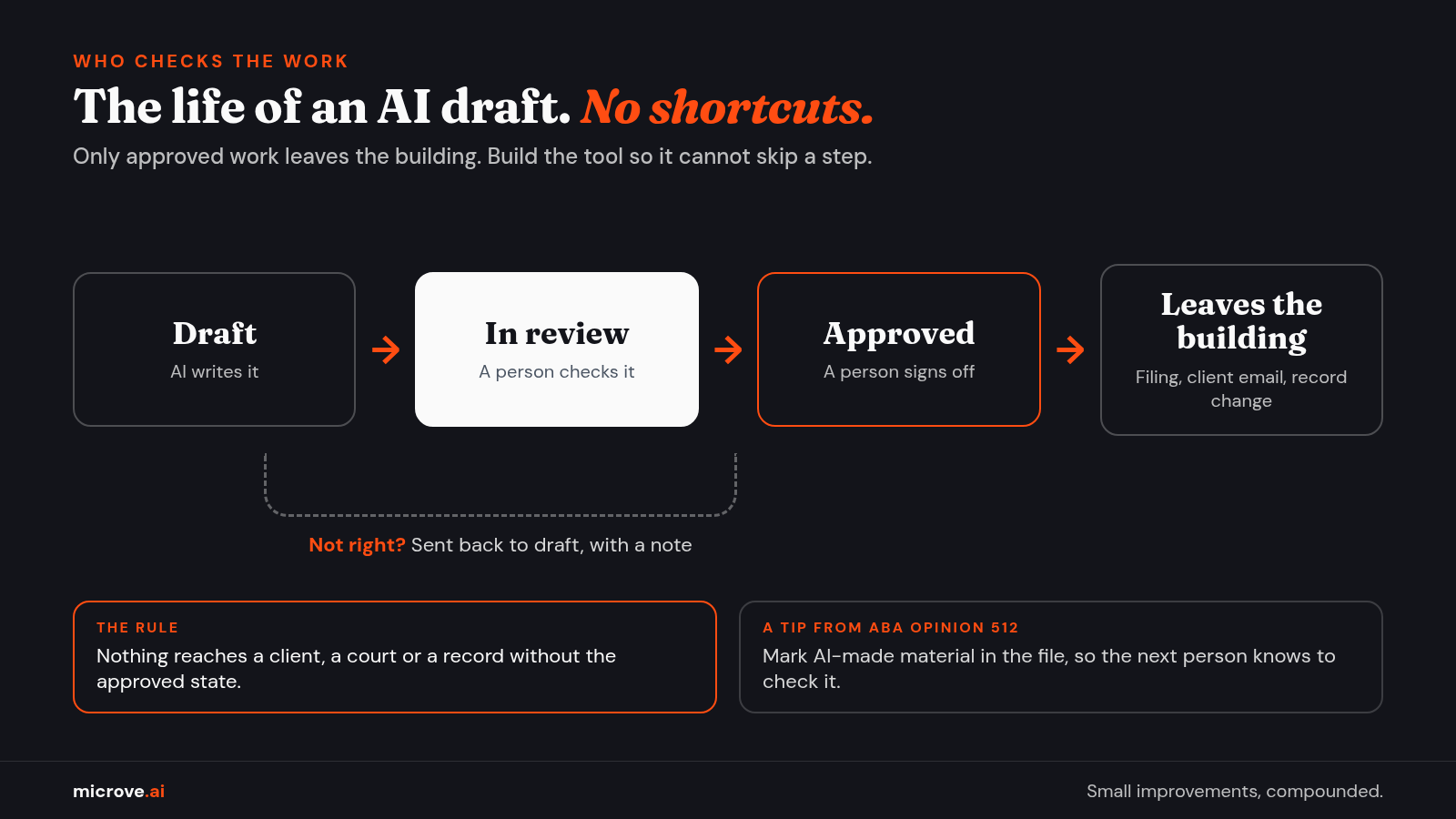
For the second question, give every AI draft a simple life cycle. It starts as a draft. A person reviews it.
It is either approved, or sent back with a note. Only approved work leaves the building: a filing, a client email, a change to a record.
Write that down as the rule, and build the tool so it cannot skip a step. The ABA opinion even suggests marking AI-made material as such when it is stored in a file, so the next person knows to check it.
Questions firms ask
Do we need client consent to use AI? It depends on the tool, the task and your state's rules. ABA Opinion 512 says consent is needed before client information goes into a self-learning tool. Ask your counsel about your setup.
Is a private setup enough on its own? No. It changes where the data goes. Access by matter, records and human review are still your job.
We are an accounting firm, not a law firm. Does this apply? Your rules differ, but the build is the same: one workflow, clear data paths, a person who approves what leaves.
Where should a smaller firm start? With the task your team complains about on Fridays. Look for one that repeats, follows clear steps and eats time.
How Microve does it
We build AI workflows end to end: find the workflow, build the tool, connect it to the software you already use, run it, and keep it working. Where the model runs, who hosts it and the review steps are decided first, not added later.
It starts with a free consultation of one to three meetings. If you decide to move forward, an optional paid scoping engagement follows and ends in a build proposal. Then you decide.
When we build a custom tool, the client owns it. Ongoing maintenance is an optional monthly plan. If you don't need AI, we'll tell you.
Have a Friday-afternoon workflow in mind? Start with a free consultation.